
IT Mushroom services
IT Projects
Upgrade, replace, move, or clean up technology without making your team coordinate every technical piece.
Bring us the project, problem or improvement you have in mind. We can plan and carry out technical work, coordinate other providers where needed, and leave your team with a usable result.
Projects we can help with
- Email & Microsoft 365 migrations
Move email, accounts, files or Microsoft 365 to a cleaner setup without making your team manage every dependency.
More details
Configure accounts and licensing, migrate email and data, and test the new setup. Check DNS, sign-in and connected applications before the move, then help users get started.
- Network & Wi-Fi upgrades
Improve coverage, reliability or capacity so people and devices can work where they need to.
More details
Review the network, wireless coverage, internet connection and affected devices. Install and configure network equipment, or coordinate specialist installation, then test connectivity where work happens.
- System replacements
Replace software or infrastructure that limits the business, is unreliable, costs too much to maintain or is difficult to support.
More details
Understand what the current system does, then configure its replacement, transfer data and connect relevant systems. Test it with users before retiring the old setup.
 Email & Microsoft 365 migrations
 Network & Wi-Fi upgrades
 System replacements
- Provider transitions
Coordinate a move from a provider that no longer fits and work through which accounts, domains, data and access can transfer.
More details
Identify accounts, services, domains, data and contacts held by the current provider. Transfer access and data, configure the incoming services and coordinate the technical handoff while your organization retains control.
- Office moves & workspace upgrades
Get connectivity and equipment ready for an office move, expansion or new location before capacity becomes a bottleneck.
More details
Set up networks, Wi-Fi and devices, and coordinate internet, phone providers and specialist installers. Plan the work around the location and opening date, then test the setup before your team uses it.
- Technology cleanup
Retire unused accounts, consolidate duplicate services and replace temporary fixes to reduce unnecessary cost and make technology easier to support.
More details
Check what is still used and who owns it before removing anything. Retire unused accounts or services with approval, consolidate duplicated tools and replace temporary fixes where appropriate.
 Provider transitions
 Office moves & workspace upgrades
 Technology cleanup
From real project work
DH Build · Company file migration
- Before
- Company files had accumulated across a Google Drive structure that no longer matched how the business operated.
- What IT Mushroom did
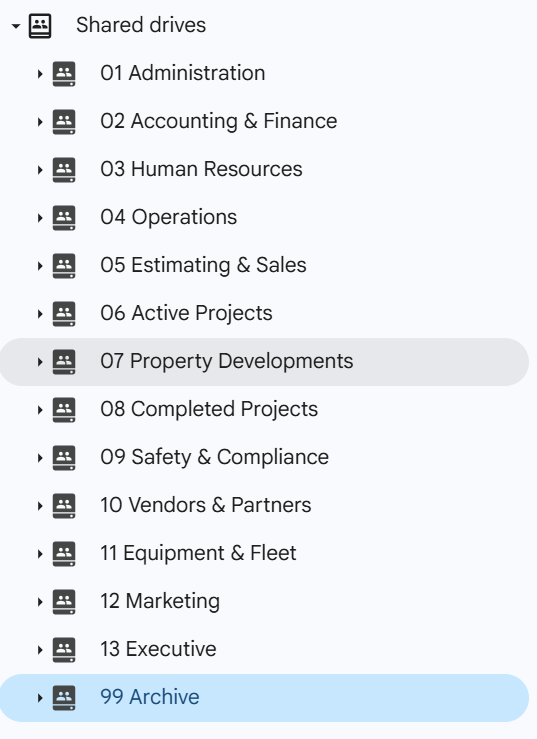
- We mapped the environment, designed a business-aligned structure, migrated files into company-owned Google Shared Drives, organized access and validated the move.
- After
- The final Shared Drive structure organized company information by business function instead of leaving it spread across accumulated project and miscellaneous folders.
From planning to handoff
From configuration and installation to migration and testing, we carry out the work needed to reach the project goal.
- Understand
Learn the systems, people and goal involved.
- Plan
Map dependencies, timing and who needs to act.
- Prepare
Prepare access, data, equipment and fallback steps.
- Implement
Configure, migrate, install or replace the systems involved.
- Verify
Test the result with your team.
- Hand off
Document the result and confirm access, contacts and support.
Planning the transition
We check the connections the project could affect, including account access, DNS, data, devices and other applications. Your organization keeps control of important accounts and decisions throughout the work.
We discuss timing, what needs to stay available and what to do if a step cannot proceed as planned. Preparation, testing and documentation support the implementation.
When other providers are part of the project
A project can involve several companies. We handle our part of the implementation and coordinate the technical dependencies, so your team has fewer conversations to chase.
- Microsoft
- Internet and phone providers
- Software vendors
- Domain registrars
- Hosting providers
- Specialist installers
Working with providers
We identify the providers involved, follow dependencies and coordinate the technical steps using the access you approve.
Your organization keeps purchasing and contract decisions. Each provider controls its own service and timing.
What a finished project should leave you with
- Access your team can use
- Know where administrative access lives and who can approve changes.
- Records and contacts within reach
- Know what changed, where useful documentation lives and which providers are involved.
- A clear support path
- Know who handles routine support and any remaining work.
Before closing the project
- Usable access is transferred through appropriate channels.
- Your organization retains key account and ownership control.
- Important system and configuration changes are recorded.
- Relevant provider contacts are known.
- The result is checked against the project goal.
- Open items and ongoing support responsibilities are clear.
Tell us what you want to improve
Tell us the goal, the systems involved and any timing constraints. You do not need a finished plan or the right service label to start.
What shapes the project
We scope projects around the goal, systems involved, dependencies, implementation and provider coordination required. We clarify those pieces before the work begins.